
|
|
| Setting Custom
Tab Stops Using |
|
| the Ruler |
|
|
|
|
|
|
|
|
|
|
|
|
|
|
|
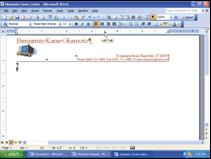
| • | With the
insertion point |
||||||||||||
| on the paragraph
mark |
|||||||||||||
| below the border,
press |
|||||||||||||
| the ENTER key |
|||||||||||||
| • | If necessary,
click the |
||||||||||||
| button at the
left edge of |
|||||||||||||
| the horizontal
ruler until it |
|||||||||||||
| displays the
Left Tab icon |
|||||||||||||
| • | Position the
mouse |
||||||||||||
| pointer on the
3.5” mark |
|||||||||||||
| on the ruler |
|||||||||||||
| • | Click the 3.5”
mark on the |
||||||||||||
| ruler |
|||||||||||||
| 51 |